Blackout Dates in Scheduling: How Sports Teams Set Them
28 November 2026

Blackout Dates in Scheduling: How Sports Teams Set Them
A blackout date is a day or time window when nothing can be scheduled: no games, no practices, no time-off requests, no bookings. For a team or club, the useful version is a short list of blocked dates that everyone sees before the season is built, so the schedule never has to be rebuilt around a holiday, a field closure or an exam week. The way to get there is simple: decide which dates truly need blocking, announce them early, and keep them in the same place where you schedule games and track who is available. That is what Sidekick is built for: scheduling, team chat, and attendance in one free app for managers, coaches, players and parents.
TL;DR
- A blackout date blocks a day or time range so no events or requests can be placed on it. It can be one-off (a field closure) or recurring (every Thanksgiving weekend).
- Block as little as you can. A narrow window is easier to defend than a blanket ban.
- Announce blackouts well ahead. Guidance for workplace scheduling puts one-off notices at 30 to 60 days; sports seasons benefit from the same habit.
- Keep blackouts, the game schedule and player availability in one place, so nobody has to cross-check three calendars.
- Sidekick gives managers scheduling, team chat and attendance tracking at no subscription cost, with only a small fee when money moves.
Table of Contents
- What blackout dates mean in scheduling
- Why teams and clubs block dates
- How to decide which dates to block
- A worked example: a youth team in a 14-week season
- How to announce blackout dates
- Handling conflicts and exceptions
- Keep blackouts, games and availability together
- A quick checklist before you publish a season
- Our perspective
- Run your season’s calendar in Sidekick
- FAQ
- Sources
What blackout dates mean in scheduling
The term comes from business scheduling. One scheduling-software help page describes blackout dates as times or days when no tasks can be scheduled or performed, such as holidays, Sundays or non-business hours. In employee scheduling, a manager’s guide from TimeForge (June 2026) describes them as predetermined windows when time-off requests or shift swaps are restricted, set in advance as guardrails rather than as punishment.
The same idea appears everywhere there is a calendar and limited capacity. Universities use it too: the City University of New York’s campus scheduling guide explains that global blackout dates make rooms unavailable for events, and that a recurring pattern can block chosen days of the week within a date range, such as Tuesdays and Thursdays between October 2 and 31.
For a sports team, the definition translates cleanly:
- A date when you will not schedule games or practices. School holidays, a venue that is closed, a local festival that clogs the roads.
- A date when players cannot be expected to commit. Exam weeks, family travel weekends, religious holidays.
- A date when a facility is reserved for something else. The same logic golf clubs use when they close tee sheets for a member event, as this guide to blackout periods in tee-time booking shows.
One-off and recurring blackouts
Blackouts come in two kinds. Recurring ones repeat on a pattern, like a tax firm blocking April 1 to 18 every year, an example in SimplyPTO’s guide to PTO blackouts. One-off ones are tied to a specific event, such as a system migration or audit. In sport, a recurring blackout might be the Thanksgiving weekend or the week your school district holds finals. A one-off might be a field resurfacing or a rep tournament that pulls half your roster.
Separate the two when you plan. Recurring blackouts go into your season template once. One-off blackouts are announced as soon as you know about them.
Why teams and clubs block dates
Businesses block dates because demand spikes are predictable and staffing is limited. TimeForge points to the National Retail Federation’s figure that a record 202.9 million consumers shopped over the five-day Thanksgiving weekend in 2025, the kind of peak that makes managers ask for all hands on deck.
A team faces the mirror image. Your peak is not shoppers, it is conflicts: the dates when you know attendance will collapse. Blocking them gives you three things.
- Fewer forfeits and thin squads. If you know a long weekend will leave you with six players, you can avoid placing a game there.
- Fairer expectations. Players and parents know the rules before the season starts, so nobody feels ambushed by a fixture on the one weekend they cannot make.
- Less rework. Moving a published game means messaging the team, the opposition, the referee and the venue. Avoiding the conflict up front costs one calendar entry.
How to decide which dates to block
The most common mistake is blocking too much. A workplace example from SimplyPTO makes the point well: a five-person retail shop does not need all of December blocked. Only December 15 to 24 needs every employee on shift, so only that ten-day stretch needs a blackout, while the rest of the month can allow some time off. Narrow blackouts are fairer and easier to defend than broad ones.
Apply the same reasoning to your season:
Start from fixed constraints
List the dates you cannot control: school calendar breaks, public holidays, league-imposed bye weeks, venue closures. These are the blackouts nobody will argue with, so put them in first.
Add the dates you know will hurt attendance
Look at last season. Which weekends had the most no-shows? Which dates did you move a game from? If your records are in the same app as your schedule, this is a quick look at attendance history. Sidekick gives managers and coaches insight into attendance, so the pattern is visible rather than remembered.
Ask the roster once, early
A short message in team chat at the start of the preseason asking for known conflicts beats a stream of one-off requests in week six. Collect them, look for clusters, and block only the dates where enough of the squad is out that a game or practice would not work.
Block a window, not a month
If six of twelve players are away the second week of the school holiday, block that week. Do not cancel the entire holiday period. Your remaining dates stay usable, and your players keep a full season.
A worked example: a youth team in a 14-week season
Say you manage a U12 team with twelve players and a season running from late August through November.
| Date range | Reason | Type | Action |
|---|---|---|---|
| Thanksgiving weekend | Family travel, school closed | Recurring | Block in season template |
| Week of fall break | Half the roster away | One-off | Block that week only |
| One Saturday in October | Field being resurfaced | One-off | Block, announce right away |
| Two mid-week evenings | Parent-teacher conferences | One-off | Block practices, keep weekend games |
Every row is a narrow window with a reason you can state in one sentence. Four entries cover the whole season, and the rest of the calendar stays open for games and practices.
How to announce blackout dates
The reason blackouts feel hostile is usually not the dates themselves but the way they are announced. SimplyPTO’s guidance for workplaces is to write recurring blackouts into the handbook, give one-off blackouts 30 to 60 days’ notice, explain the reason in a sentence, and spell out exceptions. Thirty days is the floor, not the goal.
A sports season is shorter than a work year, so adapt the rhythm:
- Before the season: Share the recurring blackouts and fixed constraints with the whole team, parents included. One message, one list.
- When something new comes up: Announce it the same day you learn about it, with the reason. “The field is closed on the 18th for resurfacing, so we have no game that weekend” takes ten seconds to write and prevents ten questions.
- When a blocked date collides with an existing plan: Honor what was already arranged where you can. The same SimplyPTO guidance warns that revoking approved plans after someone has booked travel is the fastest way to lose trust.
- Spell out exceptions. If a tournament is allowed to override a blackout, say so up front.
Team chat inside Sidekick keeps these messages next to the schedule they affect, rather than buried in a group text that half the parents have muted.
Handling conflicts and exceptions
Even with a good blackout list, conflicts happen. A few rules keep them manageable.
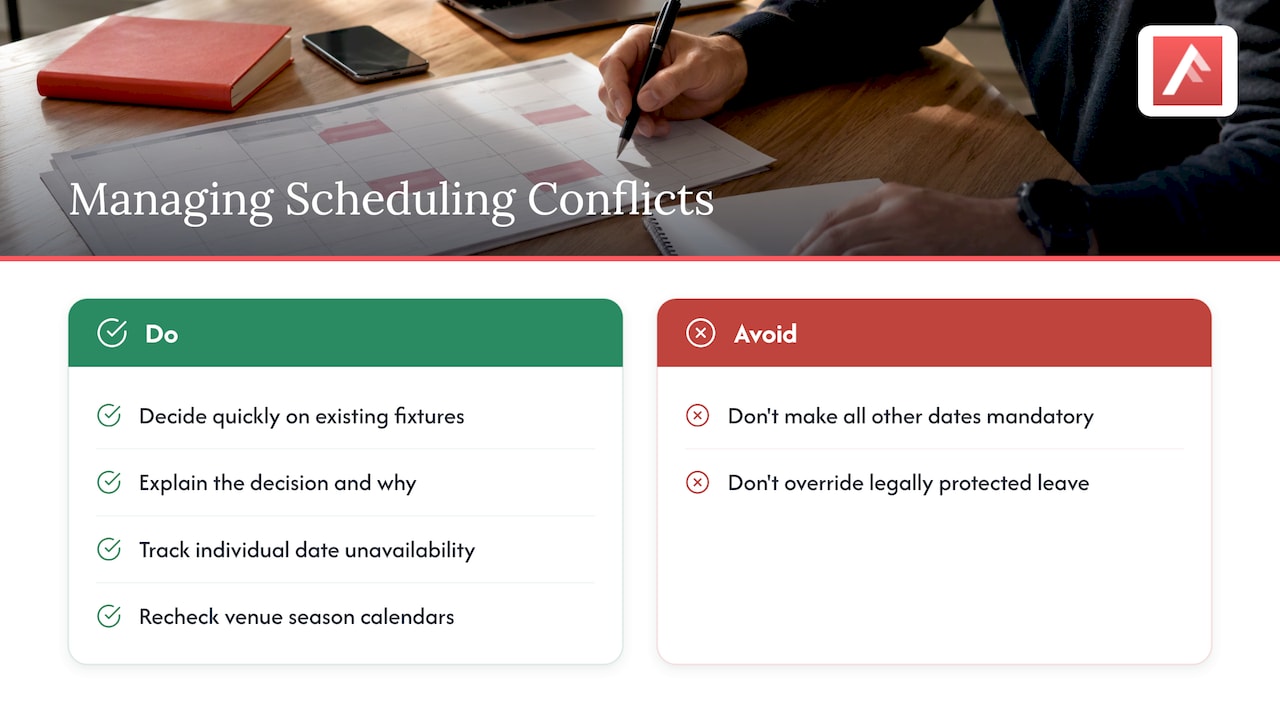
Existing games on a newly blocked date. Decide quickly whether to reschedule or keep the fixture. Tell the team what you decided and why, and give them time to adjust.
Someone who cannot make a non-blocked date. A blackout is not a promise that everything else is mandatory. Keep a separate way for players to mark themselves unavailable for individual dates. Our guide to tracking player availability in the 24 to 48 hour window covers how to read those responses before a game.
Exceptions that are legally protected. If you are scheduling employees rather than volunteers or players, such as paid coaches or facility staff, blackouts cannot override legally protected leave. TimeForge notes that blackout policies cannot override leave protected under laws such as the Family and Medical Leave Act or accommodations under the Americans with Disabilities Act. If a situation involves protected leave, check with your employer’s HR contact or an employment attorney rather than applying the blackout automatically.
Venues that publish their own blackouts. Many fields, courts and rinks close on set dates. Treat the venue’s list as your first layer of blackouts, and recheck it when the venue issues its new season calendar.
Keep blackouts, games and availability together
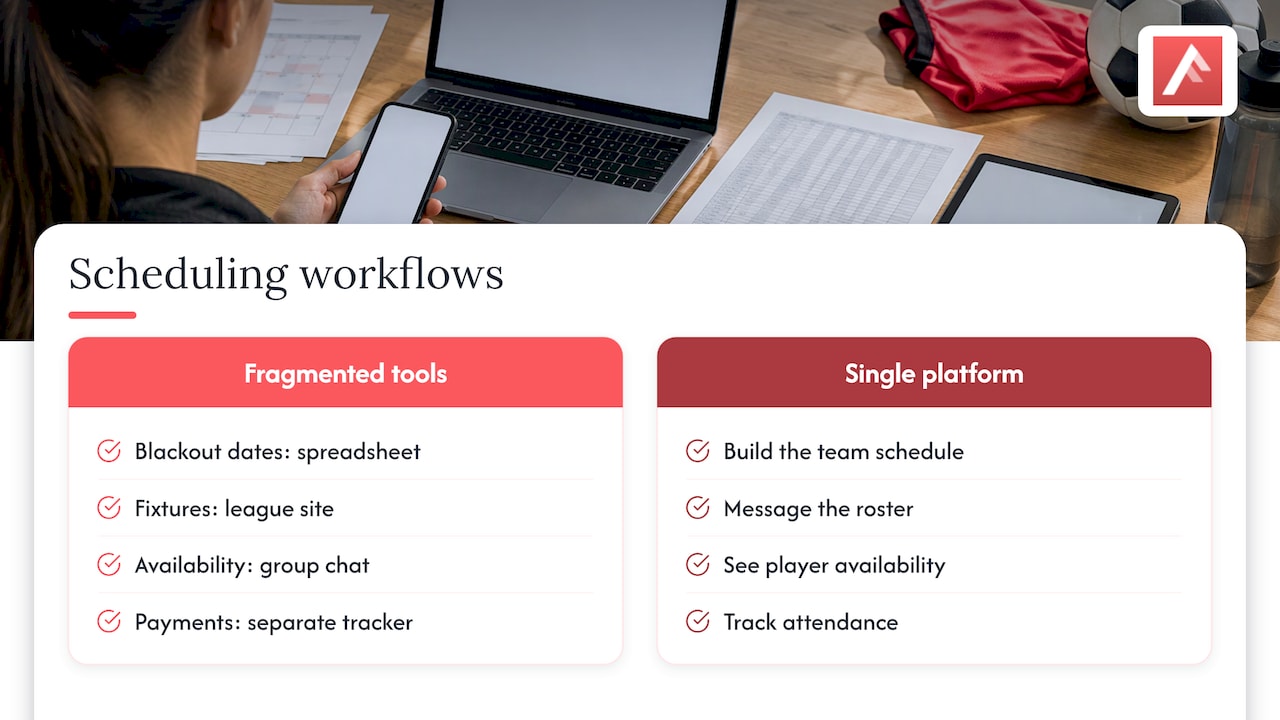
The practical problem for most volunteer managers is not understanding blackouts. It is keeping them consistent. A spreadsheet holds the blocked dates, a league site holds the fixtures, a group chat holds the availability replies, and a payment tracker sits somewhere else. Each one drifts out of sync.
A single platform removes the drift. In Sidekick you build the team schedule, message the roster, see who is available, and track attendance in the same place. Our five-step game scheduling process for league managers walks through publishing, locking and syncing a calendar, and it is where your blocked dates should be settled before you publish. If you run a larger organization, the same thinking applies to roster management across a club, where a single missed constraint multiplies across teams.
Blackout dates also matter around registration. When signups open, a flood of families asks about dates, and a clear list of blocked weekends answers half the questions. Our guide to waitlist management before signups open shows how to prepare for that rush.
A quick checklist before you publish a season
- List venue closures and school or public holidays.
- Ask the roster for known conflicts, and look for clusters.
- Block narrow windows, each with a one-sentence reason.
- Mark which blackouts repeat every year, and save them for next season.
- Announce the full list at least 30 days before the first affected date, earlier where you can.
- State any exceptions in the same message.
- Publish the schedule only after blackouts are settled, then use team chat for changes.
Our perspective
Most blackout trouble is not a calendar problem. It is a communication problem. A date is blocked in one person’s head, a spreadsheet, or a message from three weeks ago, and the team finds out when a game lands on it.
We built Sidekick so a manager does not have to hold all of that. Scheduling, team chat, rosters, attendance and payments sit in one platform, and every feature is free to use: no subscription, no paywalls, no premium tiers. We take a small fee only when money moves through registrations, gift funds or fines.
That matters for blackout dates because the people who most need good scheduling are volunteers running a team on a Tuesday night after work. If the tool costs money, or needs three other tools beside it, the blocked dates end up on a napkin. A free, single place for the schedule, the conversation and the attendance record makes the better habit the easier one.
Our advice stays short: block narrowly, say why, say it early, and keep it where the team already looks.
Mattias
Run your season’s calendar in Sidekick
If you manage a team, Sidekick lets you create and manage teams, schedule games and practices, chat with your roster and track attendance without a subscription. You pay only a small fee on payments processed, such as registrations, gift funds and fines. Start at Sidekick, or see how Sidekick for Clubs handles club-level oversight across several teams.

Club administrators running registration alongside scheduling can read how online sports registration works without subscription fees.
FAQ
What are blackout dates on a schedule?
They are dates or time ranges when nothing can be scheduled or requested. In a workplace that usually means time-off requests are restricted; on a sports team it means no games or practices are placed there. They can be one-off or repeat every year.
How far in advance should I announce blackout dates?
Workplace guidance recommends at least 30 to 60 days for one-off blackouts, with recurring ones written down in advance. For a sports season, share recurring blackouts before the season starts and announce new ones the day you learn of them, with a short reason.
Should I block a whole month or just the busy days?
Block only the days that truly cannot work. A narrow window is fairer and keeps the rest of the calendar useful. If half the squad is away for one week, block that week rather than the entire holiday.
Can a blackout date have exceptions?
Yes, and you should say so in the announcement. For example, a tournament or a league-mandated makeup game might be allowed on a blocked date. For paid staff, blackouts cannot override legally protected leave, so involve HR or an employment attorney when in doubt.
Sources
- Managing Black Out Dates on the Service & Delivery Schedule Calendar
- Blackout Dates In Employee Scheduling: A Manager’s Guide, TimeForge
- PTO Blackout Dates: When (and How) to Use Them, SimplyPTO
- CUNY Functional Guide for Campus Administrators
- Blackout Dates in Tee-Time Booking: A Guide for Golf Clubs, BallChute